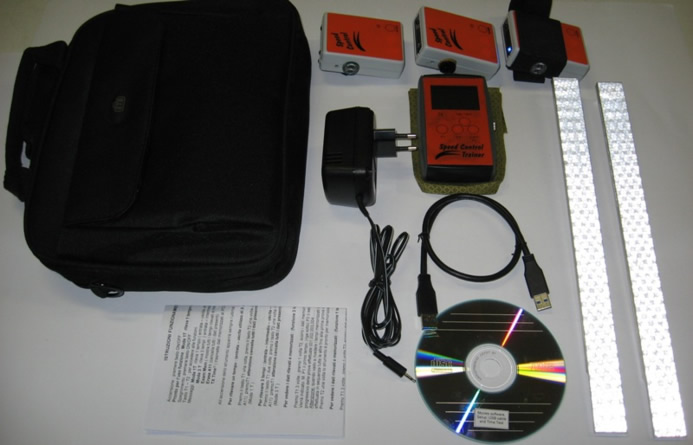
ISTRUZIONI FUNZIONAMENTO :
SPEED CONTROLL (S.C. Trasmettitore) Atleta
Grazie per aver scelto il sistema di cronometraggio via radio “Speed Controll Trainer + Speed Controll”.
Questo nuovo sistema per testare la scorrevolezza degli sci; permette di comunicare via radio direttamente
all’allenatore, il nome dell’atleta, il tempo del test, la velocità, e la temperatura, in qualsiasi momento si possono rivedere
i tempi memorizzati.
Accensione : premere tasto ON/OFF Spegnimento: premere tasto ON/OFF
All’accensione, viene emesso un suono e il led rosso da un lampeggio, questo indica che lo strumento è in funzione, poi
ogni 10 secondi il led rosso lampeggia per indicare lo stato di comunicazione con il ricevitore “Speed Controll Trainer”
(S.C.T.)
Posizionare lo strumento sulla gamba nel punto che si ritiene opportuno utilizzando la fascia dedicata data in dotazione.
Rilevamento di 1 Tempo, posizionare 2 paletti ( entrata - uscita )
Al rilevamento del primo paletto si accende il led verde e viene emesso un suono, al rilevamento del secondo paletto si
spegne il led verde viene emesso un suono e il tempo viene trasmesso al supporto “Speed Controll Trainer”. La distanza di trasmissione massima tra il “Speed Control Trainer” e lo “Speed Control” deve essere massimo di 90
metri.
Ricarica batteria: Inserire lo spinotto jack nel punto A
Tempo di carica della batteria: circa dalle 2 alle 4 ore
IMPORTANTE : Quando lo strumento rimane inutilizzato per dei giorni , la batteria va ricaricata prima di iniziare
il test dei materiali; utilizzando l’alimentatore dato in dotazione (alimentatore adatto per caricare fino a 4
strumenti contemporaneamente)
ISTRUZIONI FUNZIONAMENTO : SPEED CONTROLL TRAINER (S.C.T. Ricevitore) Allenatore Accensione : premere tasto ON/OFF Spegnimento: premere tasto ON/OFF
All’accensione sul display compare la schermata iniziale: S.C.T. (Speed Controll Trainer) – Batt : # # # (piena carica
della batteria ) Temperature : 0.00 C° ( indica la temperatura aria) Speed (Km/h) * * *, * * (Indica la velocità raggiunta nel test con una distanza prefissata di 150 m) TX: P : Indica la lettera trasmessa dallo “Speed Controll” abbinata all’atleta, durante il test. (Es, Pietro la sua iniziale
verra impostata nello Speed Controll, a ogni test arriverà il tempo, la temperatura la velocità e l’iniziale “P”
Al centro del display, viene visualizzato il tempo del test che di volta in volta arriva dallo Speed Controll (S.C.), alla
sinistra TX : (iniziale atleta) in basso a sinistra F1: Choose menù.
Premendo F1 si entra nel menù e si possono fare due scelte: premendo di nuovo F1 =Go to Times Menù, entro nel
menù successivo, premo ancora F1 : Show Times vedo i primi 4 tempi memorizzati dal “000 al 004”, la lettera iniziale
del nome dell’atleta, e il tempo,scorro i tempi in avanti premendo F1 (PgUp) fino a 83 tempi. Premendo F2 (PgDw) scorro i tempi all’indietro, se premo invece F2 : “Erase Times” (cancella tempi) entro nel menù scelta opzione cancella
tempi si / no, se premo F1 verranno cancellati tutti i tempi, premendo F2 ritorno alla schermata precedente.
Premo Exit per uscire dal menù e ritornare alla schemata iniziale
Importante : il primo tempo che si legge è quello dell’ultima prova effettuata.
Programmazione TX = trasmettitore (Speed Controll Atleta)
In questa fase è importante posizionare il trasmettitore “Speed controll” acceso, vicino al ricevitore “Speed Controll
Trainer, (nel caso ci fossero altri trasmettitori vicino lasciarli spenti, questo perchè se accesi si programmerebbero tutti
con la stessa iniziale) , quindi iniziare la programmazione.
Premo F1: Choose menù, di seguito premo F2: Program TX
Compare la scritta “Choise TX name “ A (scegli il nome del trasmettitore ) e due scelte, la prima,se premo F1 :“change”, cambio il nome del trasmettitore scorrendo le lettere dell’alfabeto e lo abbino all’atleta.
Premendo F2: “Send” confermo la scelta, e il trasmettitore TX Speed Controll emette un suono di conferma. F3: Uscita fine della programmazione.
Durante il test sul campo di gara e necessario che il ricevitore “Speed Controll Trainer” sia almeno a 150 metri di
distanza da un altro ricevitore “Speed Control Trainer”, questo per evitare disturbi di ricezione.
Quando lo Speed Controll (S.C.) si sta scaricando arriva un messaggio di segnalazione sul display dello Speed
Controll Trainer (S.C.T.) “battery Low “ ( da quel momento si ha ancora circa un ora di test) Ricarica batteria: Inserire lo spinotto jack nel punto B Tempo di carica della batteria: circa dalle 2 alle 4 ore
IMPORTANTE : Quando lo strumento rimane inutilizzato per dei giorni , la batteria va ricaricata prima di iniziare
il test dei materiali; utilizzando l’alimentatore dato in dotazione. dotazione (alimentatore adatto per caricare fino
a 4 strumenti contemporaneamente)
OPERATING INSTRUCTIONS: SPEED CONTROL (S.C. Transmitter) Skier
Thank you for choosing the "Speed Control Trainer + Speed Control" radio controlled timing system.
This new system for testing ski smoothness allows you to directly transmit the name of the athlete, test time, speed, and
temperature to the coach via radio, the stored times may then be reviewed at any moment. To turn on: press the ON/OFF button To turn off: press the ON/OFF button
When the unit is turned on, there will be a beep and the red LED will flash. This indicates that the instrument is in
operation. The red LED flashes every 10 seconds to indicate that it is in communication with the "Speed Control
Trainer (SCT) receiver.
Place the instrument in a suitable position on your leg using the leg wrap provided for this purpose.
To get one time reading, set up two poles (Start - Finish)
When the first pole is detected, the green LED lights up and you will hear a beep. When the second pole is detected,
the green LED turns off and you will again hear a beep. The time is then transmitted to the "Speed Control Trainer" unit.
The maximum transmission distance between the "Speed Control Trainer" and "Speed Control" units should be no more
than 90 meters. Recharging the battery: Insert the jack at position A Time to charge battery: 2 - 4 hours
IMPORTANT: When the instrument has not been used for several days, the battery should be recharged before
use; use the supplied power supply unit (the power supply unit may be used to charge up to 4 instruments at
once).
OPERATING INSTRUCTIONS:
SPEED CONTROL TRAINER (S.C.T. Receiver) Coach To turn on: press the ON/OFF button To turn off: press the ON/OFF button
When the unit is turned on, the display screen shows the message: S.C.T. (Speed Control Trainer) – Batt: # # # (Battery
fully charged) Temperatures: 0.00 C° (Air temperature) Speed (Km/h) * * *, * * (The speed detected at a fixed distance of 150 m) TX: P : indicates the letter sent by the "Speed Control" corresponding to the athlete during the test. (e.g. for a skier
named Peter, by entering the letter "P" into the Speed Control each test will display the time, temperature, speed and
the letter "P"
The center of the display shows the times coming from the Speed Control (S.C.) unit, to the left appears TX: (skier
initial), and, at bottom left F1: Choose menu.
By pressing F1 you enter the menu and you can make two choices: F1 = Go toTimes menu, or F2: Erase Times. Press F1 again to enter the next menu; press F1 again to Show Times and see the first four stored times from “000 to
004”, the first letter of the skier's name and the time; quickly advance the times by pressing F1 (PgUp) up to 83 times,
press F2 (PgDw) {ut discount10} to quickly see times in reverse.
Press Exit to exit the menu and return to the start screen Press F2 to Erase Timeschoose the menu option yes / no, pressing F1 will erase all times, while pressing F2 will
return you to the previous screen. F3: Exit Important: the first time displayed is the last recorded time.
Programming the TX = transmitter (Speed Control skier)
Here it is important that the "Speed Control" transmitter is turned on and near the "Speed Control Trainer"; if other
transmitters are nearby, be certain that they are turned off as you do not want to program them all with the same letter. Press F1: choose menu, then press F2: Program TX
This screen will display “Choose TX name “ A (choose the transmitter name ) and two choices; the first, by pressing
F1: “change”, changes the name of the transmitter, holding down F1 scrolls down the alphabet corresponding to the
skiers. Press F2: “Send”, this confirms the letter choice and the TX transmitter Speed Control will beep. F3: Exit
When using the instrument during competitions, the "Speed Control Trainer" device must be at least 150 meters away
from other "Speed Control Trainer" devices to prevent interference with reception.
When the Speed Control (S.C.) unit battery is low a message will appear on the Speed Control Trainer (S.C.T.) display: "Low battery" (this indicates about one hour of battery life remaining) Recharging the battery: Insert the jack at position B Time to charge battery: 2 - 4 hours
IMPORTANT: When the instrument has not been used for several days, the battery should be recharged before
use; use the supplied power supply unit (the power supply unit may be used to charge up to 4 instruments at
once).
BETRIEBSANLEITUNGEN : SPEED CONTROLL (S.C. Sender) Athlet
Wir bedanken uns, dass Sie das Funk-Zeitmessungssystem “Speed Control Trainer + Speed Control” gewählt haben.
Dieses neue System ermöglicht es, das Gleiten der Ski zu testen und die Zeiten via Funk direkt dem Trainer der Name des
Athlete, die Testzeit, die Geschwindigkeit und die Temperatur mitzuteilen. Es können auch jedes Mal die gespeicherten Zeiten
angesehen werden, dazu ein dafür bestimmtes Band benutzen und das Gerät positionieren (zum Beispiel auf einem Skistock). Einschalten: die Taste ON/OFF drücken Ausschalten: die Taste ON/OFF drücken
Beim Einschalten ertönt ein Signal und die rote Led blinkt; so wird angezeigt, dass das Gerät in Betrieb ist; dann blinkt alle 10
Sekunden die rote Led, um den Kommunikationsstatus mit dem Empfänger “Speed Control Trainer” (S.C.T.) anzugeben.
Das Instrument auf einer geeigneten Stelle am Bein positionieren und das mitgelieferte Band benutzen.
Erfassen von 1 Zeit, 2 Torstangen positionieren (Start – Ziel)
Beim Erfassen der ersten Torstange schaltet sich die grüne Led ein und es ertönt ein Signal; beim Erfassen der zweiten
Torstange schaltet sich die grüne Led aus, es ertönt ein Signal und die Zeit wird an “Speed Control Trainer” übertragen.
Der maximale Übertragungsabstand zwischen “Speed Control Trainer” und “Speed Control” darf maximal 90 Meter betragen. Laden der Batterie: den Jack-Stecker in den Punkt A einsetzen Ladezeit der Batterie: circa 2 bis 4 Stunden
WICHTIG: Wenn das Gerät über einige Tage nicht benutzt wird, muss die Batterie aufgeladen werden, bevor mit dem
Materialtest begonnen wird; das mitgelieferte Netzteil benutzen (Netzteil geeignet, um bis zu 4 Instrumente gleichzeitig
zu laden)
BETRIEBSANLEITUNGEN : SPEED CONTROL TRAINER (S.C.T. Empfänger) Trainer Einschalten: die Taste ON/OFF drücken Ausschalten: die Taste ON/OFF drücken
Beim Einschalten erscheint auf dem Display die Anfangsbildschirmseite: S.C.T. (Speed Control Trainer) – Batt : # # # (Batterie
komplett geladen) Temperaturen : 0.00 C° (zeigt die Lufttemperatur an) Speed (Km/h) * * *, * * (gibt die im Test erreichte Geschwindigkeit auf einer vorbestimmten Strecke von 150 m an) TX: P : Der “Speed Controll” Zeigt, im Laufe dieses Test, der Buchstabe, dass mit dem Athlete verbunden ist. (z.B. Paul -
seiner Anfangsbuchstabe wird am Anfang jedes Tests in der Speed Controll eingestalten werden, bei jedem Test werden die
Testzeit, die Temperatur, die Geschwindigkeit und der Anfangsbuchstabe des Athletes angezeigt.
In der Mitte des Displays wird die Testzeit angezeigt, die jedes Mal den Speed Control (S.C.), links TX: (Anfangsbuchstabe des
Athletes) unten links F1 erreicht: Menüauswahl. F1 drücken, um auf das Menü zuzugreifen, es gibt zwei Auswahlmöglichkeiten: die Anzeige der gespeicherten Zeiten durch
erneutes Drücken von F1 = Show Times (die gespeicherten Zeiten können jederzeit angezeigt werden) oder der Zugriff auf das
Menü „Löschen von Zeiten“ durch Drücken von F2 = Erase Times Drücken von F1 : Show Times zeigt die ersten 4 gespeicherten Zeiten von “000 bis 004“ an, die Anfangsbuchstabe des
Athletes und die Testzeit.
Durch Drücken von F1(PgUp) werden die Zeiten vorwärts bis zu 83 Zeiten gelesen, durch Drücken der Taste F2(PgDw) werden
die Zeiten rückwärts gelesen. Exit drücken, um das Menü zu verlassen und auf die Anfangsbildschirmseite zurückzukommen. WICHTIG : die erste Zeit, die abgelesen wird, ist die Zeit des zuletzt durchgeführten Tests. Drücken von F2 Erase Times (Löschen von Zeiten): im Menü die Option Zeiten löschen ja/nein wählen, durch Drücken von F1
werden alle Zeiten gelöscht. F2 drücken, um zur Auswahl im Hauptmenü zurückzukehren. F3 Exit zum Abbrechen und zur Rückkehr zur Anfangsbildschirmseite.
TX Programmierung = Sender (Speed Controll Athlete)
Bei dieser Stufe muss der eingeschaltete Sender "Speed controll“ in der Nähe der Empfänger „Speed Controll Trainer“
positioniert werden(In dem Fall andere Empfänger in der Nähe sind, muss man sie ausgeschaltet halten: falls sie eingeschaltet
sind, werden alle sich mit dem gleicher Anfangsbuchstabe programmiert worden). Dann, fängen mit der Programmierung an.
F1 drücken: Menüauswahl, nachher F2 drücken: Program TX (TX Programmierung)
Die Aufschrift „Choise TX name“ A erscheint (Auswähl der Name der Sender), sowie auch zwei Auswahlmöglichkeiten: F1 „change“ drücken (ändern): es ist möglich der Name desr Sender zu ändern. F1 weiter drücken, die Anfangsbuchstaben werden aufrollen. Wählen die Anfangsbuchstabe nach der Name des Athletes. F2 drücken „send“ – der Wahl wird bestätigt. Beim Bestätigung ertönt ein Signal. F3 Exit zum Abbrechen und zur Rückkehr zur Anfangsbildschirmseite
Bei einem Test während eines Wettkampfs muss der Empfänger “Speed Control Trainer” mindestens 150 Meter Abstand
von einem anderen Empfänger “Speed Control Trainer” haben; so werden Empfangsstörungen vermieden.
Wenn sich der Speed Control (S.C.) entlädt, erscheint auf dem Display von Speed Control Trainer (S.C.T.) die Nachricht “battery Low “ ( ab diesem Zeitpunkt bleibt noch circa eine Stunde Testzeit) Laden der Batterie: den Jack-Stecker in den Punkt A einsetzen Ladezeit der Batterie: circa 2 bis 4 Stunden
WICHTIG : Wenn das Gerät über einige Tage nicht benutzt wird, muss die Batterie aufgeladen werden, bevor mit dem
Materialtest begonnen wird; das mitgelieferte Netzteil benutzen (Netzteil geeignet, um bis zu 4 Instrumente gleichzeitig
zu laden)